Lively secondary motion, without simulation.
Dynamic skinning is a set of deformers that offset each vertex from the motion of the skeleton and time. Because the offsets are computed directly instead of solving physics equations, the method is extremely fast, predictable and easy to art-direct.
Real-time
A closed-form offset per vertex, on CPU or as a GPU vertex shader. Interactive on meshes with hundreds of thousands of vertices.
Works on existing rigs
Uses the skeleton and the skinning weights you already have. The effect adapts itself to the rig, with no extra setup.
Artist friendly
A few intuitive parameters (frequency, damping, amplitude, drag) and paintable weights. No Young's modulus to tune.
Oscillations, from global to local.
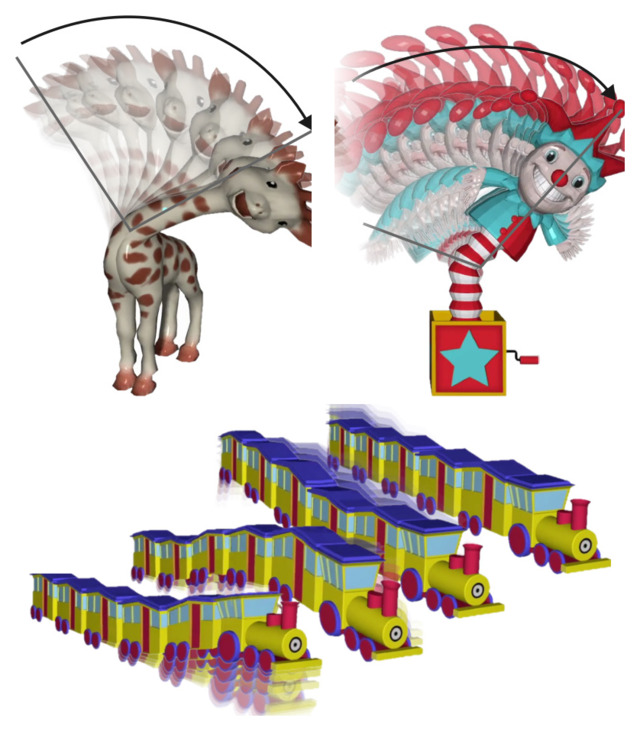
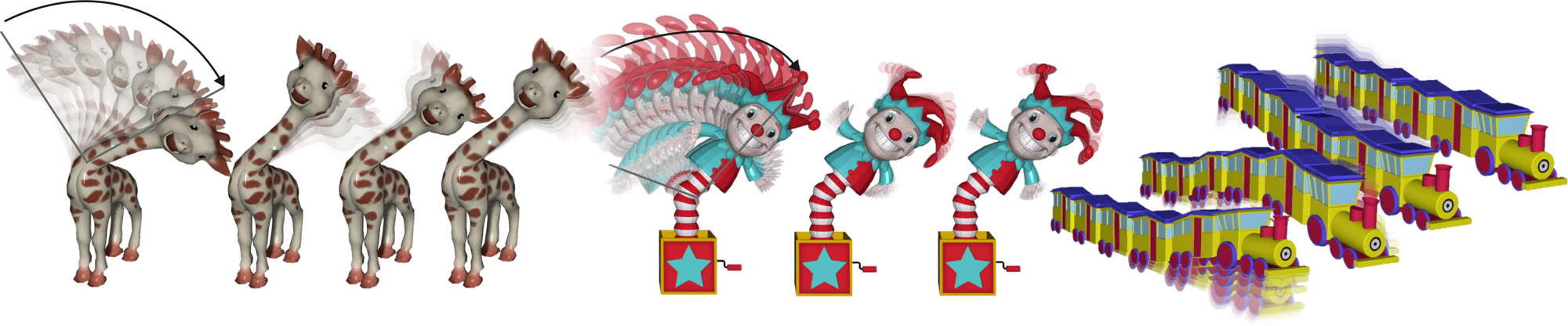
The same oscillation deformer gives a global wobble along the whole shape, a localized jiggle in the extremities, or a resonance with the motion. Pick an example to compare standard skinning (left) with dynamic skinning (right).
Giraffe
The neck swings left and right: the whole shape keeps oscillating after each stop, following the hierarchy of the skeleton.
Play with it, right now.
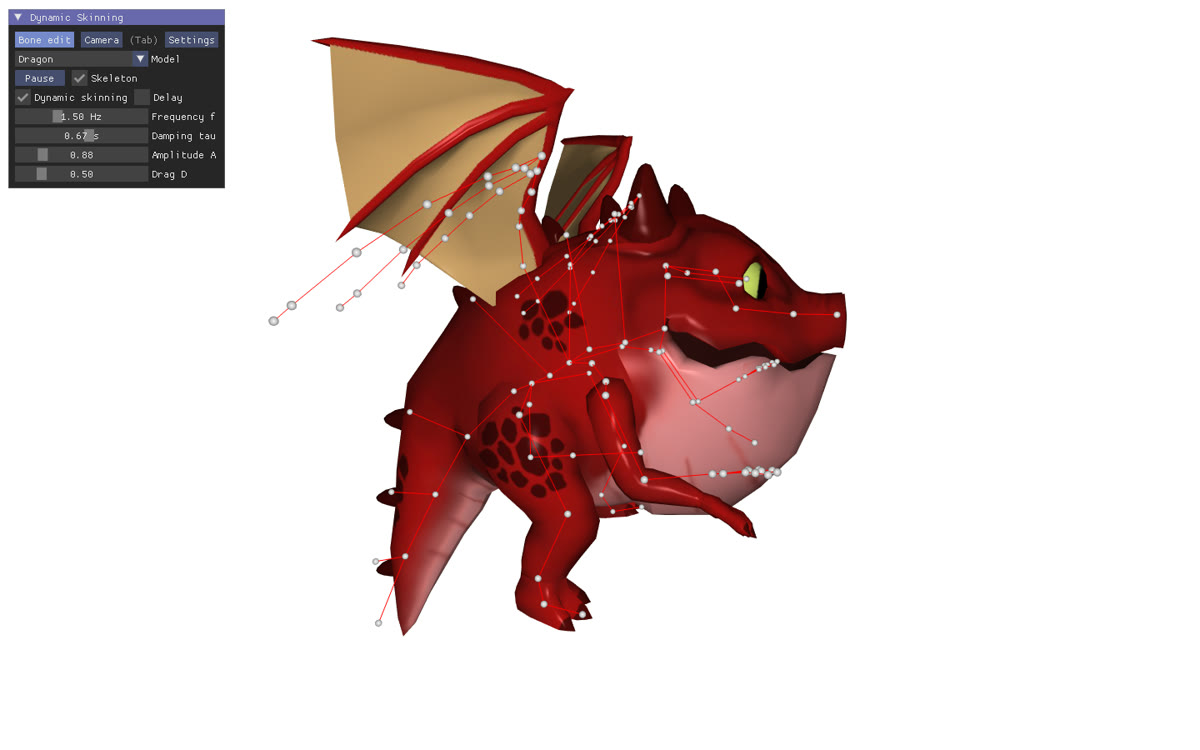
The complete C++ application, compiled to WebAssembly and running in your browser.
- Eight characters, each with its own animation
- Grab a joint and swing it to feel the response
- Tune frequency, damping, amplitude and drag live
- CPU or GPU skinning, skeleton and weights display
Needs a WebGL 2 browser. About 1 MB to start, the other characters are downloaded when needed. Works best on a desktop.
Deformers driven by the skeleton's kinematics.
Each joint's angular velocity is recorded over time and filtered by an oscillation kernel. The filtered motion bends the vertices it influences, blended along the hierarchy with weights derived from the skinning weights.
- fFrequency: how fast the material wobbles.
- τDamping: how long the oscillation lasts.
- AAmplitude: how much it bends.
- DDrag: lag proportional to the velocity, for a softer follow-through.
Plus flexible deformation origins and paintable per-vertex weights, to restrict the effect to the soft parts of a character (wing membranes, tentacles, hat, ears…).
The formula, in plain words
Read κ(t) as the response of the skin to a sudden kick: A sets how far it swings, sin(2πf t) makes it go back and forth f times per second, and exp(−t/τ) makes the swing fade out after about τ seconds.
- Measure. For each joint, its angular velocity Ωj is measured every 1/60 s and kept in a short history.
- Filter. Every change of speed (a start, a stop, a change of direction) launches a damped wobble shaped by κ, and the wobbles add up. The drag term D Ωj adds a lag proportional to the current speed: alone, it is Velocity Skinning, and it vanishes as soon as the joint stops, while the wobbles keep going.
- Bend. Each vertex is rotated around the joint, against the motion, by an angle that grows with its distance to the joint. The weight βij sums the skinning weights of the joint and of all its descendants: turning the shoulder bends the whole arm.
The algorithm
// Precomputation, from the skinning weights α
for each vertex i, joint j:
  βij = sum of αik over k = j and its descendants

// Each frame, after standard skinning (LBS)
for each joint j:
  Ωj = angular velocity of j
  append Ωj to its history Hj      // step Δt = 1/60 s
  Fj = D Ωj                         // drag
     + Σk κ(kΔt) · ΔHj(t − kΔt)   // oscillations

for each vertex i at position pi:
  di = 0
  for each joint j with βij > 0:
    θ = −γi ‖Fj × (pi − qj)‖
    p' = rotate pi around joint qj,
         axis Fj, angle θ
    di += βij (p' − pi)
  pi = pi + di
ΔHj is the change of angular velocity between two consecutive samples, and γi the (paintable) bend weight of the vertex.
A separate deformer: delayed skinning
Independently of the oscillations, the article introduces a time-delay filter, the delayed linear blend skinning (dLBS). The rotation of each joint reaches a vertex with a delay equal to their distance along the skeleton divided by a speed c: the motion travels from the root to the extremities, like a wave.
Here, only the delay is active, without oscillation. dLBS replaces standard skinning, and the oscillations can be added on top of it.
Dynamic skinning in Blender.
An extension for Blender 4.4+, available on the official Blender Extensions platform, that adds oscillations and drag to any mesh with an Armature modifier, both while posing bones and during animation playback.
- In Blender, open Edit › Preferences › Get Extensions, search for Dynamic Skinning and click Install (or drag and drop it from its page on Blender Extensions).
- Select a rigged mesh and click Enable in Object properties › Dynamic Skinning (or the N sidebar).
- Rotate a bone in Pose Mode, or press play: the mesh lags, then oscillates.
Prototype (v0.1.2, GPL-3.0-or-later). Offline install: dynamic_skinning-0.1.2.zip, then Install from Disk. Oscillations and drag, with an Oscillation off / on switch to compare with velocity skinning (drag only); without the delay (dLBS) or flexible origins. Real-time playback, no bake yet.
The article
Dynamic Skinning: Kinematics-Driven Cartoon Effects for Articulated Characters
IEEE Transactions on Visualization and Computer Graphics, vol. 32, no. 3, pp. 2684–2694, 2026.
We present an extension to traditional rig skinning, like Linear Blend Skinning (LBS), to produce secondary motions that exhibit the appearance of physical phenomena without need for simulation. At the core of the technique, we call dynamic skinning, is a set of deformers which offset position of individual vertices as a function of position derivatives and time. Examples of such deformers create effects such as oscillation in response to movement and the appearance of wave propagation, among others. Because the technique computes offsets directly and does not solve physics equations, it is extremely fast to compute. It also boasts a high degree of customizability which supports a desirable artist workflow and fine level of control. Finally, we showcase the technique in a number of scenarios and make comparisons with the state of the art.
@article{rohmer2026dynamic,
  author  = {Rohmer, Damien and Salem, Karim and
             Kalyanasundaram, Niranjan and Zordan, Victor},
  title   = {Dynamic Skinning: Kinematics-Driven Cartoon
             Effects for Articulated Characters},
  journal = {IEEE Transactions on Visualization and
             Computer Graphics},
  volume  = {32},
  number  = {3},
  pages   = {2684--2694},
  year    = {2026},
  doi     = {10.1109/TVCG.2026.3653317}
}
Supplementary video
Overview of the method, results on all the characters and comparisons with the state of the art (4 min).
The application, and its code.
The interactive application used for all the results of the article, in C++17 and OpenGL 3.3. It runs on macOS, Linux and Windows, and in the browser.
Complete application
- The characters of the article, each with its own pre-designed animation
- Click a joint and drag it: the mesh lags, then oscillates
- Live tuning of f, τ, A, D, flexible origins and painted bend weights
- Skinning on the CPU, or on the GPU in a vertex shader (250k-vertex Cthulhu in real time)
- Delayed skinning (dLBS) as a separate option
- Same code for the web version, compiled with Emscripten
# dependencies: CMake, GLFW (macOS: brew install cmake glfw)
git clone https://github.com/drohmer/dynamic_skinning
cd dynamic_skinning/code
cmake -S . -B build -DCMAKE_BUILD_TYPE=Release
cmake --build build -j
build/complete
Linux: sudo apt install cmake pkg-config libglfw3-dev. Windows: Visual Studio with CMake, GLFW is included.
Use it in your own skinning pipeline
The method is a small, self-contained module (about 550 lines of C++ for the oscillations). It takes the skeleton and the skinning weights you already have, and adds an offset after standard skinning: one call at load time, one call per frame.
This is all the dynamic skinning of the minimal application:
Minimal application// Once, after loading the character: // weights β_ij, empty velocity history dynamic_skinning_initialize(ds_state, model, mesh); // Each frame: pose, then standard skinning model.set_skeleton_from_animation(anim, t); model.skinning_lbs(mesh); // κ(t) = A exp(-t/τ) sin(2πf t), and drag D ds_parameters.frequency = 2 * Pi * f; ds_parameters.attenuation = 1 / tau; ds_parameters.amplitude = A; ds_parameters.drag = D; // adds the offsets d_i to the LBS positions dynamic_skinning_apply(ds_state, ds_parameters, model, mesh, t);
What is in the repository
code/app_complete/The complete application: all the characters, GPU skinning, joint picking, web version.
code/app_minimal/The simplest use of the method, on the CPU, with three characters.
code/dynamic_skinning_source/The method itself, shared by both applications.
code/shaders/skinning/The GPU version, as a vertex shader.
blender_addon/The Blender extension (numpy), with examples and tests.
paper/The author's version of the article.
Velocity Skinning
The first step of this line of work: squashy and floppy cartoon deformations triggered by the skeletal velocity, as a single-pass vertex shader. Honorable Mention of the Günter Enderle Award.
Line of work
- 2021Velocity Skinning for Real-time Stylized Skeletal Animation. Rohmer, Tarini, Kalyanasundaram, Moshfeghifar, Cani, Zordan. Eurographics 2021, Computer Graphics Forum 40(2).
- 2022Acceleration Skinning: Kinematics-Driven Cartoon Effects for Articulated Characters. Kalyanasundaram, Rohmer, Zordan. Graphics Interface 2022.
- 2025Dynamic Skinning: Kinematics-Driven Cartoon Effects for Articulated Characters. Salem, Rohmer, Kalyanasundaram, Zordan. SIGGRAPH 2025 Posters.
- 2026Dynamic Skinning: Kinematics-Driven Cartoon Effects for Articulated Characters. Rohmer, Salem, Kalyanasundaram, Zordan. IEEE TVCG 32(3), 2026 (this page).
Authors
* At the time of this work.